


If you manage Google Ads campaigns, you've likely encountered redundant keywords without even realizing it. These sneaky duplicates lurk in your account, causing your ads to compete against each other and wasting your budget. Understanding what they are and learning how to eliminate them can significantly improve your campaign performance.
This guide covers everything you need to know about redundant keywords in Google Ads, from identification to removal, plus tools that make the process easier.
What Are Redundant Keywords in Google Ads?
A redundant keyword is any term in your account that can trigger ads for the same search queries as another keyword you're already bidding on.
Common examples include:
- The same term with different match types (exact, phrase, broad)
- Slight variations like "running shoes" and "shoes for running"
- Plural vs. singular versions in the same ad group
- Overlapping terms across multiple ad groups
Google's algorithm determines which entry enters the auction when multiple options qualify for the same search. This means you lose control over which ad appears and how your budget gets spent.
Since 2023, Google has expanded its definition to include terms across different match types. Previously, "running shoes" as exact match and "running shoes" as phrase match were considered distinct. Now Google may treat them as duplicates that should be consolidated.
Why Redundant Keywords Hurt Your Campaigns
Having overlapping terms creates several problems that directly impact your return on investment.
Budget cannibalization. Your entries compete in the same auctions, potentially driving up your costs. Instead of one winning efficiently, multiple options fight for the same impression.
Unpredictable ad serving. You might have crafted specific ads for specific terms, but keyword overlap means Google chooses which triggers, not you.
Reporting becomes unreliable. When the same search query gets attributed to different entries, analyzing performance and making optimization decisions becomes nearly impossible.
Quality Score dilution. Click-through rates get spread across multiple entries instead of concentrating on one, which can lower your Quality Scores over time.
How to Find Redundant Keywords
Before you can remove problematic entries, you need to identify them. Here are the most effective methods.
Google Ads Editor method. Download your account, navigate to Keywords, and click "Find duplicate keywords." The tool displays all matches, letting you sort by campaign, ad group, or match type.
Manual spreadsheet review. Export your terms to Excel or Google Sheets. Sort alphabetically and scan for obvious matches. Use conditional formatting to highlight similar entries.
Signs of redundancy. Watch for entries with very similar performance metrics, search terms reports showing the same queries triggering multiple options, or recommendations from Google suggesting you have duplicates.

For larger accounts, manual review becomes impractical. That's where automated search term management tools become essential.
How to Remove Redundant Keywords
Once you've identified these issues, follow these steps for cleanup:
Step 1: Export your data. Include impressions, clicks, conversions, and Quality Score. You need performance data to make informed decisions about which entries to keep.
Step 2: Group related terms. Cluster entries that target the same searches. Compare their metrics side by side.
Step 3: Choose winners. For each group, select the entry with the best combination of Quality Score, conversion rate, and cost efficiency. Consider your bidding strategy and campaign goals.
Step 4: Remove or pause losers. Use Google Ads functionality to eliminate the underperformers. Pausing (instead of deleting) lets you restore them if needed.
Step 5: Monitor results. Track performance for 2-4 weeks after cleanup. Ensure the remaining entries maintain or improve their metrics.
Should You Remove Redundant Keywords Automatically?
A common question: should you let Google automatically handle duplicates it identifies? Google offers an auto-apply setting that removes them without your approval.
The consensus among PPC professionals is to keep manual control. Here's why:
Google's algorithm favors broad match when consolidating. If you have exact match and broad match versions of the same term, auto-apply typically keeps the broad match. This might not align with your campaign strategy.
Auto-removal doesn't consider your optimization goals. An entry with lower volume but higher conversion rate might get removed in favor of a higher-volume, lower-converting alternative.
When auto-apply makes sense: If you manage dozens of accounts with limited time and your campaigns already use broad match primarily, automation reduces maintenance work.
When manual control is better: For accounts where precise targeting matters, conversion-focused campaigns, or situations where you've intentionally structured terms across match types for bidding strategies.
Tools for Managing Redundant Keywords
Beyond Google Ads Editor, several cleanup options exist:
Google Ads Editor (Free) - Built-in duplicate finder, good for basic identification but limited analysis.
Third-party PPC platforms - Tools like Optmyzr and WordStream offer more sophisticated detection with performance-based recommendations.
AI-powered solutions - Newer tools use machine learning to identify not just exact duplicates but semantic overlaps that humans might miss.
The right tool depends on your account size and how much time you want to invest in keyword management and optimization.
How CATTIX Helps with Keyword Cleanup
CATTIX approaches management differently. Instead of just finding duplicates, the platform's Search Term Cleaner analyzes your actual search terms to identify wasteful queries, including those caused by keyword overlap.
The Keyword Analysis feature shows each entry's search volume and cost data, making it easy to spot underperformers.
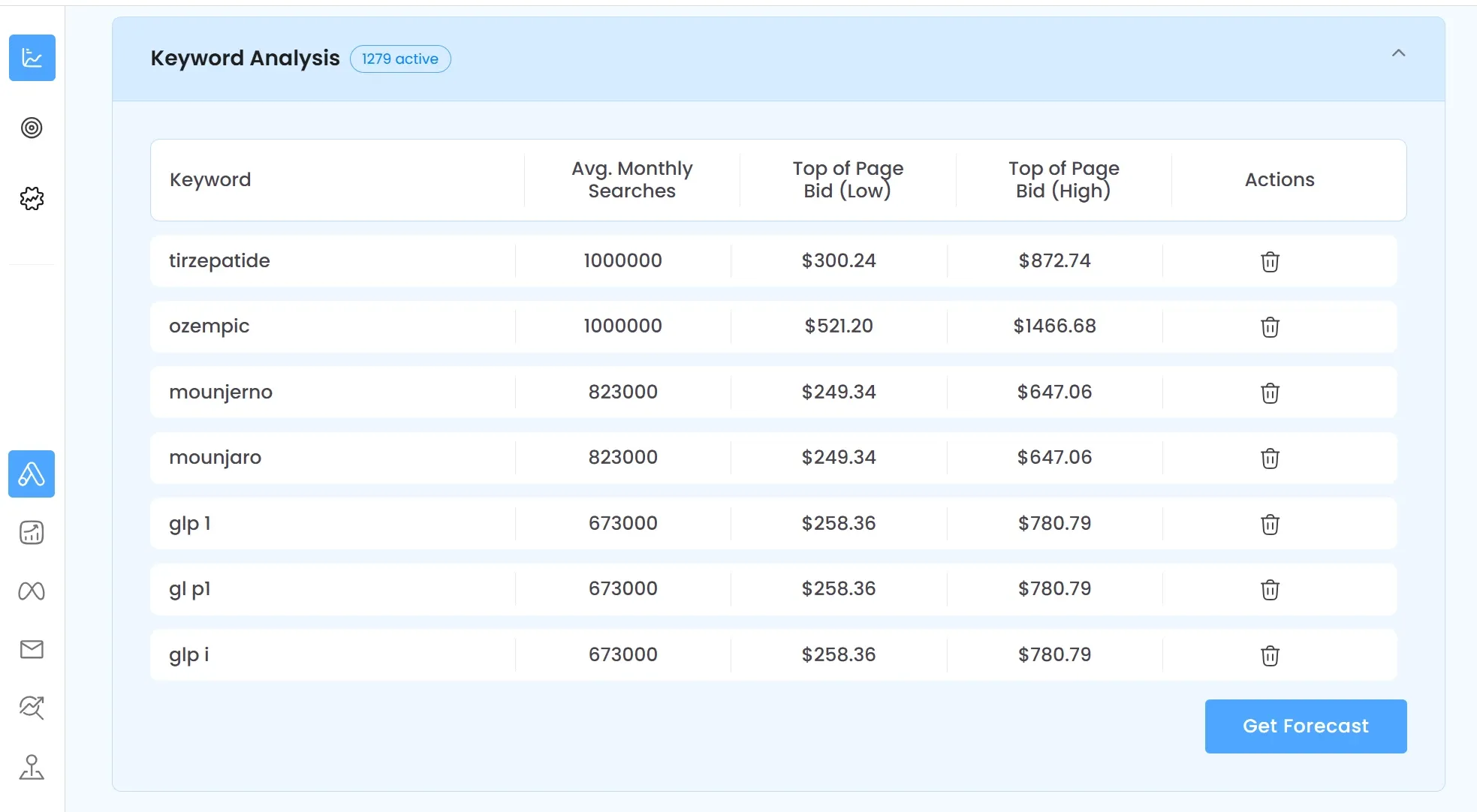
With ai keyword management capabilities, CATTIX can recommend which entries to consolidate based on performance patterns, not just text matching. This goes beyond simple detection to help you build cleaner, more effective keyword lists.
Combined with ppc automation tools for campaign building, CATTIX provides end-to-end management from research through optimization.
Frequently Asked Questions
What are redundant keywords in Google Ads?
These are multiple entries in your account that can trigger ads for the same search queries. This includes identical terms with different match types, close variations, and semantically similar phrases across ad groups.
Should I remove redundant keywords from my campaigns?
In most cases, yes. They cause internal competition, waste budget, and make performance tracking difficult. The main exception is when terms serve different geographic targets or distinct campaign objectives.
How do I find duplicate keywords in Google Ads?
Use Google Ads Editor's "Find duplicate keywords" feature for a quick check. For thorough analysis, export to a spreadsheet or use a PPC management platform like CATTIX that automatically identifies overlapping entries.
Does Google automatically remove redundant keywords?
Google can auto-remove if you enable auto-apply recommendations. However, many advertisers disable this because Google tends to keep broad match entries, which may not match your optimization strategy.
What happens if I have overlapping keywords?
Your entries compete in the same auctions, Google's algorithm decides which triggers (not you), costs may increase from self-competition, and performance reporting becomes less accurate.
How do keyword duplicates affect Quality Score?
Overlap can dilute click-through rates across multiple entries, potentially lowering Quality Scores. Consolidating to your best-performing option often improves overall account health.
Can I use the same keyword in different ad groups?
Technically possible, but generally not recommended. The entries compete against each other, and you lose control over which ad shows. Structure ad groups with distinct terms instead.
What tools can help me find redundant keywords?
Google Ads Editor offers free duplicate detection. For advanced features including AI-powered analysis and automated cleanup recommendations, consider ai google ads management platforms like CATTIX.
Clean Up Your Redundant Keywords Today
These duplicates silently drain your Google Ads budget and muddy your optimization efforts. Regular cleanup using the methods above keeps your account efficient and your reporting accurate.
Ready to automate keyword cleanup? Try CATTIX and let AI handle the heavy lifting while you focus on strategy.
About the Author
Eugene Ugolkov, CEO and Founder at CATTIX
Eugene is the founder of CATTIX, an AI-powered Google Ads management platform. With extensive experience in digital marketing and machine learning, he leads the development of intelligent advertising solutions that help businesses maximize their ROI.
Publications: Google Scholar